A 3-hour experiment in curiosity and usefulness
I’ve been curious about n8n for a while and wanted to pair some learning with delivering something that could actually help people. Based on recent conversations in the department, I picked a simple test case: bringing delivery insights together for teams and especially for EMs.
What I’m trying to do
The idea here isn’t to automate thinking. It’s to reduce admin and help EMs get signals faster. Not everyone wants to pull data or translate cycle time graphs into an intervention. If the information is already summarised and surfaced, they can act sooner.
Longer term, I imagine something like an early warning view. If cycle time starts drifting up, they can respond quickly, maybe by bringing WIP down. For some teams, like Platform or SEO, I can see these summaries being used directly in retros.
This is about augmenting information so a human can make a better decision.
How I approached it
I time-boxed everything to three hours. The goal wasn’t a finished solution. It was: learn n8n, get something moving end-to-end, and stop when I had proof.
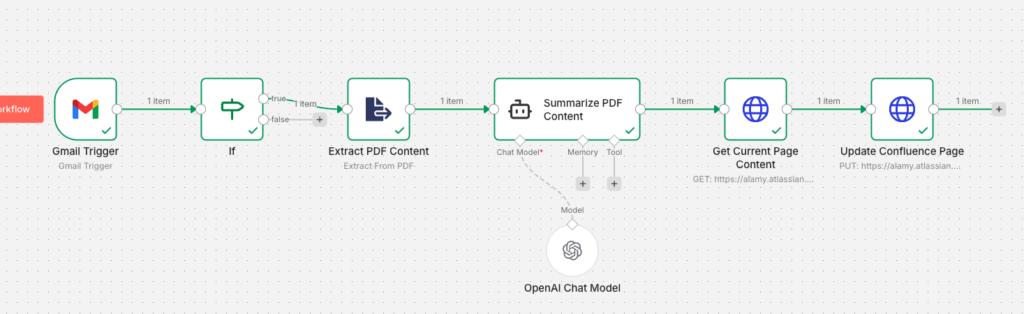
Rough flow:
- Screenful emails a bi-weekly PDF report
- Use a scheduled trigger to read the email and detect a PDF attachment
- Extract the content
- Send it to OpenAI for a short delivery summary
- Update an existing Confluence page with the result
I set up a free n8n account with my work email. I watched their beginner video (about ten minutes) and that was enough to get hands-on. I used their AI workflow builder to generate a skeleton, then added credentials for Gmail, OpenAI and Confluence.
From there it was trial, tweak, run, repeat. Some things I checked manually. In a couple of cases the AI builder suggested config changes for me. Rusty JavaScript slowed me down a touch, but not enough to break the time-box.
Findings
The free n8n UI was easier than expected. You get 20 AI builder credits a month, which was fine for this experiment but wouldn’t be enough if this became regular.
Because of M365 permissions I switched to Gmail instead of Outlook. If we ever want to take this further, that swap shouldn’t be a blocker. Power Automate could also handle the attachment retrieval.
I added a couple of helper nodes to avoid burning time on JSON formatting errors. Long-term they might not be necessary, but they helped me get a working run.
And in the end, the full workflow ran cleanly.
Future considerations
The blocker here won’t be automation tooling. It will be data quality in Jira.
That means:
- correct work item types
- tagging and categorisation
- clarity between support, roadmap, BAU
- enough historical signal to compare trends
If teams tighten that up, this becomes exponentially more valuable. Atlassian Rovo will easily be able to extend this further once the data is present within Confluence, I see trend analysis and bespoke summaries based off questions as something that won’t be far off.
Closing
It was a fun little experiment, and getting it working in an afternoon was satisfying. It reminded me how quickly the landscape is moving and how low the entry level is becoming with agent-style tooling.
I’d like to keep iterating so it stays useful and grounded in real problems. And I’m keen to share it with our squad leadership groups and see what it could unlock in 2026.